
We can run Facebook ads for your boat charter, on Facebook and Instagram, from your dashboard. Open Marketing, connect your Facebook Page, pick where the ads send people, set a daily budget between €1 and €50, add a card and click Activate Marketing. Our system then picks your boats and makes the ads every day.
What it costs
You set a daily budget with the slider, from €1 to €50 a day. The screen shows the monthly estimate next to it. Your card is charged in euros every 30 days: the daily budget times 30. The screen says it as it is: 9% of ad spend goes to platform fees & maintenance. The rest goes directly to Meta. That 9% is part of your budget, not on top of it.
If a charge fails, the ads stop and the screen shows Last charge failed with the reason.
Before you start
You need a Facebook Page for your company, and you need to be able to manage it. Without one, the connection stops with No Facebook Pages found on your account.
How to set up your ads
- In your dashboard, open Marketing.
- Click Get Started. The setup screen opens.
- Under Connect Facebook Page, click Connect Facebook Page. Facebook asks you to sign in and choose your page. This lets our partner Boosterberg manage and optimise your campaigns. You come back to the setup screen, which shows your page as Connected.
- Under Destination, choose where people land when they click an ad. Charter.boats Search shows search results filtered to your boats. Your Landing Page sends them to your own charter.boats site.
- Under Post Visibility, choose Public Posts to also show the ads as posts on your Facebook Page, or Hidden Ads to keep them off your page.
- Under Messenger, choose Standard Ads, which link to your destination, or Message Ads, which let people message you from the ad. With Message Ads, you answer those messages on Messenger.
- Under Budget & Payment, move the slider to your daily budget and enter your card.
- Click Activate Marketing.
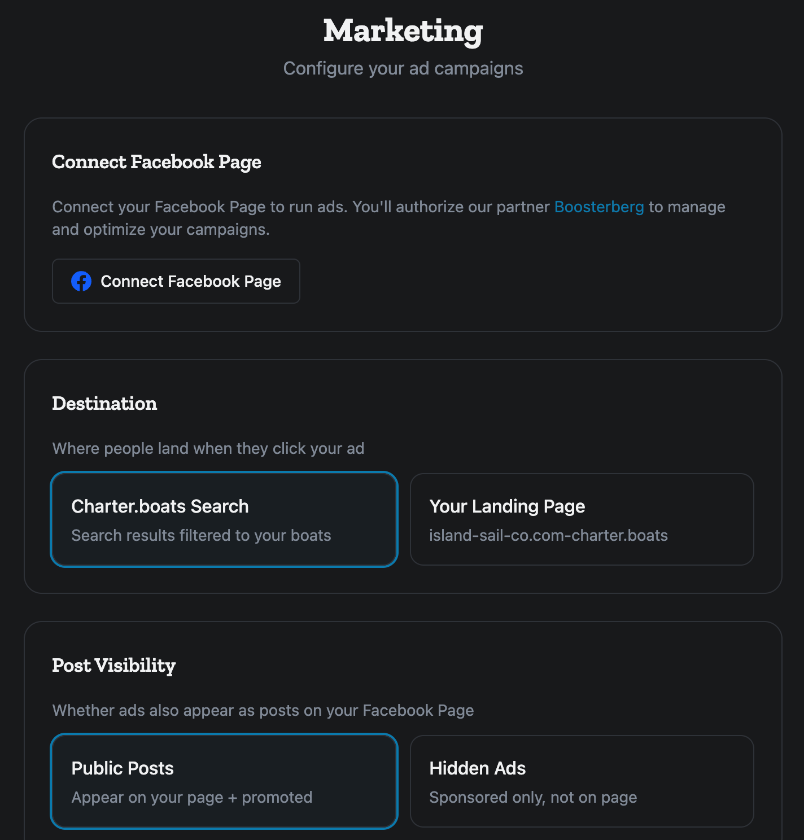
Each choice is saved as soon as you click it. There is no save button. Activate Marketing stays greyed out until your page is connected and your card is entered; the line under it says which one is missing.
If you pick Your Landing Page, build that site first. See How do I build my own charter website with charter.boats?
Which boats get advertised
You do not pick the boats. Our system picks up to five of your boats. It favours boats with open dates in the next 2 to 12 weeks, a good price and a current discount, so the money goes to the weeks you still need to fill. New ads are made every day. Keep your prices and calendar up to date, because that is what the choice is based on.
What you see once the ads run
The Marketing page then shows Your ads are running, with:
- Impressions, Engagement, Visits, Detail Views and Spend, for the last 7d, 30d or 90d.
- Monthly Budget: how much of this month's budget is spent.
- Recent Ads: each ad with its boat, its type and its results. Until the first ads are made, it reads No ads yet for this period. Ads are generated daily.
If an ad could not be made, a yellow line says Last generation failed and why. We try again on the next run.
Changing or stopping your ads
To change your settings or stop the ads once they are running, write to support@charter.boats or ask Mermaid in the chat.
For the other screens in your dashboard, see the Owner Dashboard guide. If something on this screen does not match what you see, ask Mermaid in the chat, or write to support@charter.boats.