
Every booking in your dashboard carries one status word. An Option is a timed hold with no money in yet, On waitlist is a guest queued behind someone else's option, and Confirmed means the guest has paid. That is the charter booking option meaning in short; the rest of this page explains each word, and the filters that sort them.
You find all of them on Dashboard, then Bookings. Each booking is a card. It shows the guest's name, a status line, the boat and the dates, and the money on the right. Click a card to open the booking.
The status words
The same words appear on every operator screen.
Pending Approval is a guest's request on a boat that needs your approval. Nothing is paid yet. You accept it or decline it. See How do I accept a booking request or send a special offer?.
Option is a timed hold with no money in yet. It is a request you accepted, or a hold placed when a guest started checkout. Where we know when the hold ends, the line reads Option · expires with the date and time, or expired once that time has passed.
The guest sees the same stage as Awaiting payment. Option is charter industry talk, so we do not show that word to guests.
On waitlist is a guest queued behind someone else's option on the same dates. It holds nothing. The line reads On waitlist · option ahead expires, with the expiry of the option in front of it. When that option frees and this guest is next, the place turns into an Option on its own and the guest is told. Nothing is charged at that point. A waitlist card opens the boat's page, not a booking, because it is not a booking yet.
Confirmed means the guest has paid and the charter is on. On the list card a paid booking shows Booking # and its reference instead of a status line.
Balance Pending means the guest paid the deposit of a split payment and the balance is still due. The badge stays green, because the charter is on.
Completed means the charter has ended.
Declined means you refused the request. Its dates are free again.
Cancelled means the booking was cancelled, by the guest, by you or by the system.
How to find one kind of booking
- Open Bookings.
- Open the first dropdown. It starts on All.
- Pick a filter. Options shows every reservation not paid yet and not cancelled: requests waiting for your answer and options alike. Bookings shows the paid ones, by deposit or in full. On waitlist shows the waiting places. Upcoming shows everything not cancelled whose start date is still ahead. Completed shows ended charters. Cancelled shows cancelled and declined ones.
- If you have more than one boat, use the second dropdown, All boats, to show one boat only.
A red counter beside the filters, followed by option or options, tells you how many reservations are not paid yet.
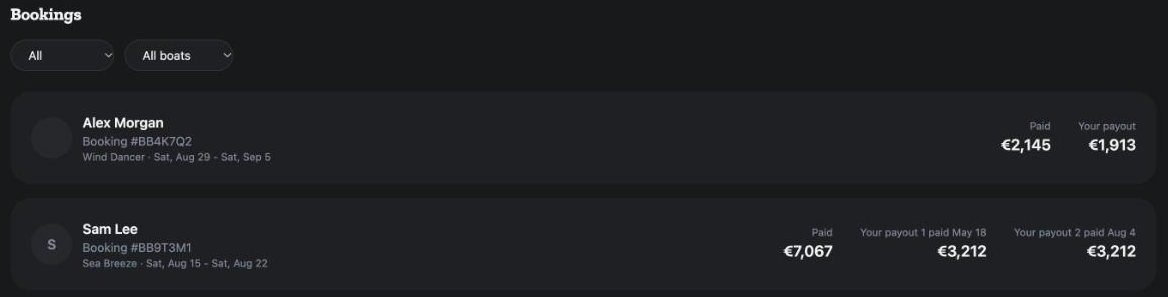
What the money on a card means
The first figure depends on the stage. Due now is shown on a reservation that is not paid yet. Paid is shown once the guest has paid in full. Guest total is shown when only the deposit is in, or when the booking was cancelled.
Next to it is Your payout. When the payout comes in parts, each part has its own line, for example Your payout 1 due by a date, or paid and the date it was sent. When and how the money reaches you is in When and how do I get paid?.
The booking page
Open a booking to see the same status as a badge under Booking # and its reference. One sentence under the badge says what happens next. A request reads that the guest has requested to book. An accepted request reads You accepted the guest's request. Waiting for payment. A paid booking reads Booking confirmed. The charter begins on its start date. An ended one reads This charter has been completed.
What to do at each stage
A Pending Approval booking needs your answer. An Option needs nothing from you; the guest pays from their booking page, and you can message them from the booking. An On waitlist place needs nothing either; it moves up on its own. A Balance Pending booking is on; the balance is collected from the guest. From Confirmed onwards there is nothing to do but get the boat ready.
For the other screens in your dashboard, see the Owner Dashboard guide. If a status on your screen does not match this page, ask Mermaid in the chat, or write to support@charter.boats.