
We pay you by bank transfer. On a boat you price here yourself, your charter boat owner payout is due the day after the charter starts. On a boat sold through MMK or Nausys, it follows that charter company's payment plan. Enter your bank details once, in Settings, then Payments.
Nothing is scheduled until the guest has paid. Fees marked to be paid at the base are not part of the payout: you collect those from the guest yourself.
When the money arrives
On a boat you price here yourself (Direct), you get one payout, due the day after the charter starts.
If the guest paid in two parts, a deposit first and the balance later, the payout is scheduled once the balance is in.
On a boat sold through MMK or Nausys, the payout follows that partner's payment plan. It can come in several parts, on the dates in the plan. We email the schedule to your company email. If the partner gives no plan, you get one payout the day after the charter starts.
We also email your company when a payout is sent.
How it is paid
Every payout is a bank transfer. Euro bookings are paid to your EUR account. Dollar bookings are paid to your USD account.
A payout is never more than we actually hold for the booking. If the guest is refunded, the payout is reduced, or cancelled when nothing is left.
Where you see what you earn
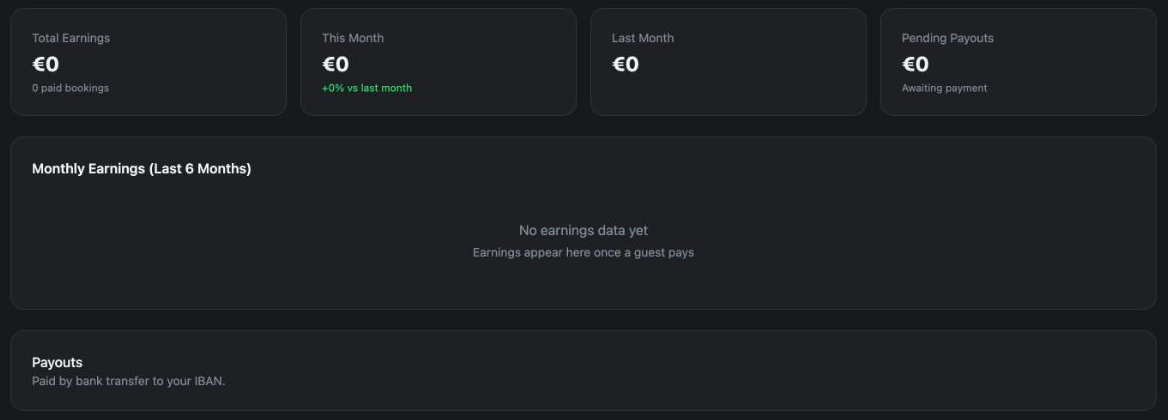
In your dashboard, open Bookings. The top of the page shows four tiles.
Total Earnings adds up your payouts on paid bookings, with the number of paid bookings under it. This Month and Last Month add up your payouts on paid bookings made in that month. Pending Payouts adds up your payouts on bookings you accepted that the guest has not paid yet.
Below them, Monthly Earnings (Last 6 Months) is a bar chart. The Payouts box says Paid by bank transfer to your IBAN.
Further down, each booking card shows Your payout. When the payout comes in parts, each part has its own line, for example Your payout 1 due by a date, or paid and the date it was sent.
How one booking adds up
- In Bookings, click the booking.
- Find the Price section.
- The first line is Guest total: everything the guest pays online. While money is coming in it also shows Already paid and a percentage.
- Under Settlement to You you see each Your payout line, with the date it is due or the date it was paid.
- Below those are Platform commission and Platform fee. The platform fee is the €45 the guest pays per booking.
Your payouts, the platform commission and the platform fee add up to the guest total. Before the booking is paid, the page shows one Your payout line with the total you will receive.

How to add your bank details
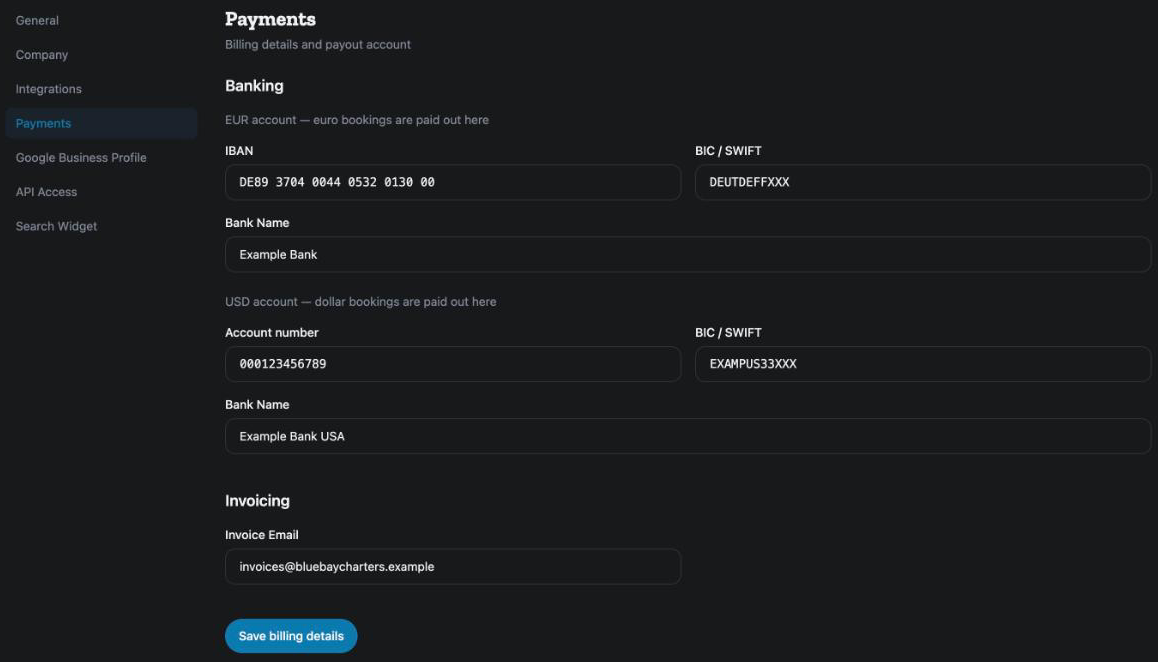
- In your dashboard, open Settings, then Payments.
- Under Banking, fill in the EUR account: IBAN, BIC / SWIFT and Bank Name.
- If you have dollar bookings, fill in the USD account too: Account number, BIC / SWIFT and Bank Name.
- Under Invoicing, type the Invoice Email where our invoices should go.
- Click Save billing details. The message Billing details saved confirms it.
Only the company owner can change these details. Team members see the form greyed out, with the note Only the company owner can change the contact email, bank, tax, invoicing and booking-policy details.
The same page also says: Stripe payouts are coming for operators in the countries Stripe supports, and we will tell you when you can connect. Until then, every payout is a bank transfer.
The commission invoice
Once the last payout of a booking is sent, we email you a commission invoice for that booking. It goes to your Invoice Email, or to your company email if that is empty.
The invoice is addressed to the boat's Invoice to field, if you filled it in. You find it in the boat editor, under the charter rules: Who our commission invoice for this boat is addressed to. Leave empty to use your company details. When it is empty, the invoice uses your company's legal and billing details. Those are explained in How do I edit my company profile and cancellation policy?.
If a figure looks wrong
Check the booking's Price section first: it shows each payout and its date. The status words on the card are explained in What do Option, On waitlist and the other booking statuses mean?.
For the other screens in your dashboard, see the Owner Dashboard guide. If something here does not match what you see, ask Mermaid in the chat, or write to support@charter.boats.