
To create a boat charter discount coupon, open Discounts in your dashboard, click New Coupon, set the amount, the boats and the dates, and click Create Coupon. A coupon is your own discount: it comes out of what you receive for the booking, never out of our commission.
A coupon stops where your payout on a booking would reach zero. It stacks with any discount you already set in MMK or Nausys, so the guest gets both. Coupons only show on charter.boats.
Two kinds of discount
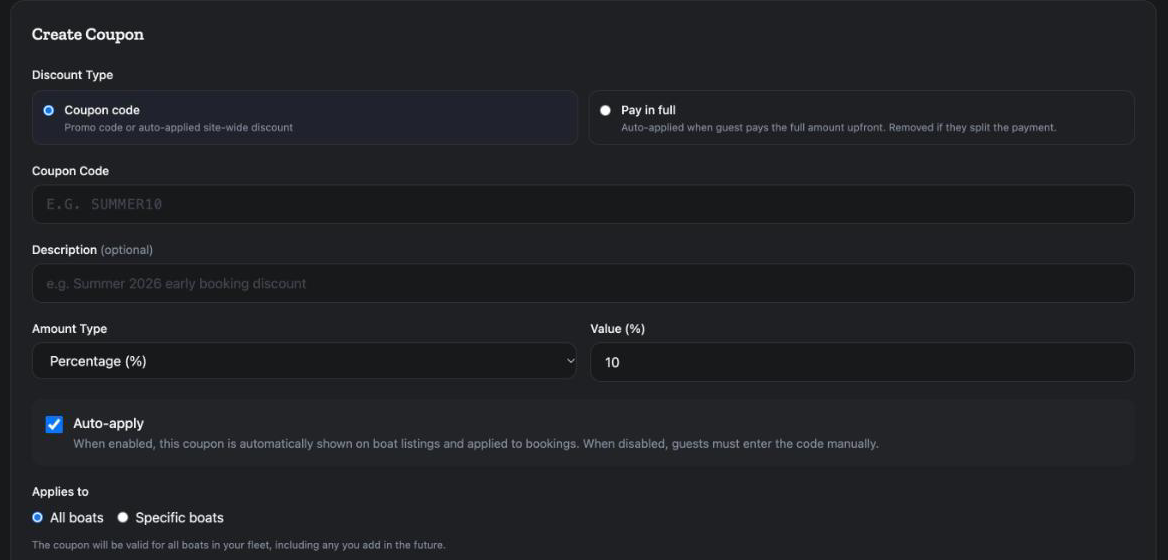
When you create one, you first choose the Discount Type.
Coupon code is a promo code, or a discount applied on its own across your listings. The screen says Promo code or auto-applied site-wide discount.
Pay in full rewards guests who pay everything at once. The screen says Auto-applied when guest pays the full amount upfront. Removed if they split the payment. It is a percentage only, it always applies to all your boats, and it is capped at 20%. You can have one active pay-in-full discount at a time.
How to create a coupon
- In your dashboard, open Discounts. The page is called Discounts & Coupons.
- Click New Coupon. The first time, the button reads Create Your First Coupon.
- Under Discount Type, pick Coupon code or Pay in full.
- Type the Coupon Code guests will use, for example SUMMER10.
- Add a Description if you like. It is optional.
- Under Amount Type, pick Percentage (%) or Fixed Amount. For a fixed amount, pick the Currency: EUR or USD.
- Type the Value.
- Leave Auto-apply ticked if the coupon should show on your listings and apply by itself. Untick it if guests must type the code.
- Under Applies to, pick All boats, which includes boats you add later, or Specific boats and tick the ones you want.
- Under Bookable, pick Anytime, or Specific dates and set Book from and Book until. These are the dates on which the booking is made.
- Under For stays, pick Any stay, or Specific dates and set Check-in from and Check-in until. These are the charter dates the coupon covers.
- Set Max Uses if you want a limit. Leave it empty for no limit.
- Click Create Coupon. For pay in full the button reads Create Pay-in-Full Discount.
An early booking discount
The two date windows work together. For an early booking discount, set Bookable to the months you want people to book in, and For stays to the season it covers. For example: book in November, and get the discount on a May charter. Guests who book later pay the normal price.
Auto-apply or manual?
With Auto-apply on, the screen says the coupon is automatically shown on boat listings and applied to bookings. Guests see the lower price while they search, which is what you want for a season-wide yacht charter discount.
With it off, guests must enter the code manually. That suits a code you hand out yourself, for example to returning guests, a club or a newsletter.
Your coupon list
Each coupon on the list shows its code, the discount, Auto-apply or Manual, its booking and stay dates, how often it was used, which boats it covers, and who created it.
To change a coupon, click the pencil. The form reads Edit Coupon. Make your changes and click Save Changes.
To stop a coupon, click the bin icon, Deactivate, and confirm with Deactivate. The coupon stops working and leaves the list.
A discount for one booking only
You can also give one guest a discount on one reservation, before they pay.
- Open the booking in Bookings.
- Find the Operator Only Section. Guests do not see it.
- To use an existing coupon, pick it under Discount coupon and click Apply.
- To make a new one, click New coupon for this reservation, choose % or an amount, type the value and click Create & apply.
That coupon is one-time: it is for this boat and these dates only, it can be used once, and it is not applied anywhere else. For changing the price in other ways, see How do I accept a booking request or send a special offer?.
A different setting: max commission discount
Company settings has a setting called Max commission discount. It is not a coupon and you do not need it to create one. It is explained in How do I edit my company profile and cancellation policy?.
For the other screens in your dashboard, see the Owner Dashboard guide. If something here does not match what you see, ask Mermaid in the chat, or write to support@charter.boats.