
To add fees to your boat listing, open the boat editor, scroll to Additional Fees and click + Add Fee. Give the fee a name and an amount, say how it is charged, mark it Required or not, and choose who collects it: Paid at the base or Billed at booking.
That covers final cleaning, a skipper, a transit log, extra equipment and any other charge. You can add fees only on boats you price yourself.
How to add a fee
- In your dashboard, open Boats and click the boat's name.
- Scroll down to Additional Fees and click + Add Fee.
- Type the name, for example "Final cleaning" or "Skipper".
- Type the amount in euros. 0 is allowed, for an extra that is included.
- Pick how often it is charged: Per booking, Per day, Per night, Per person, Per person / day, Per person / night, Per person / week, Per week or One way.
- Pick a category: Service, Equipment or Other.
- Leave Required ticked if every guest must pay it. Untick it for an optional extra.
- Under Who collects it, pick Paid at the base or Billed at booking.
- Click Add Fee.
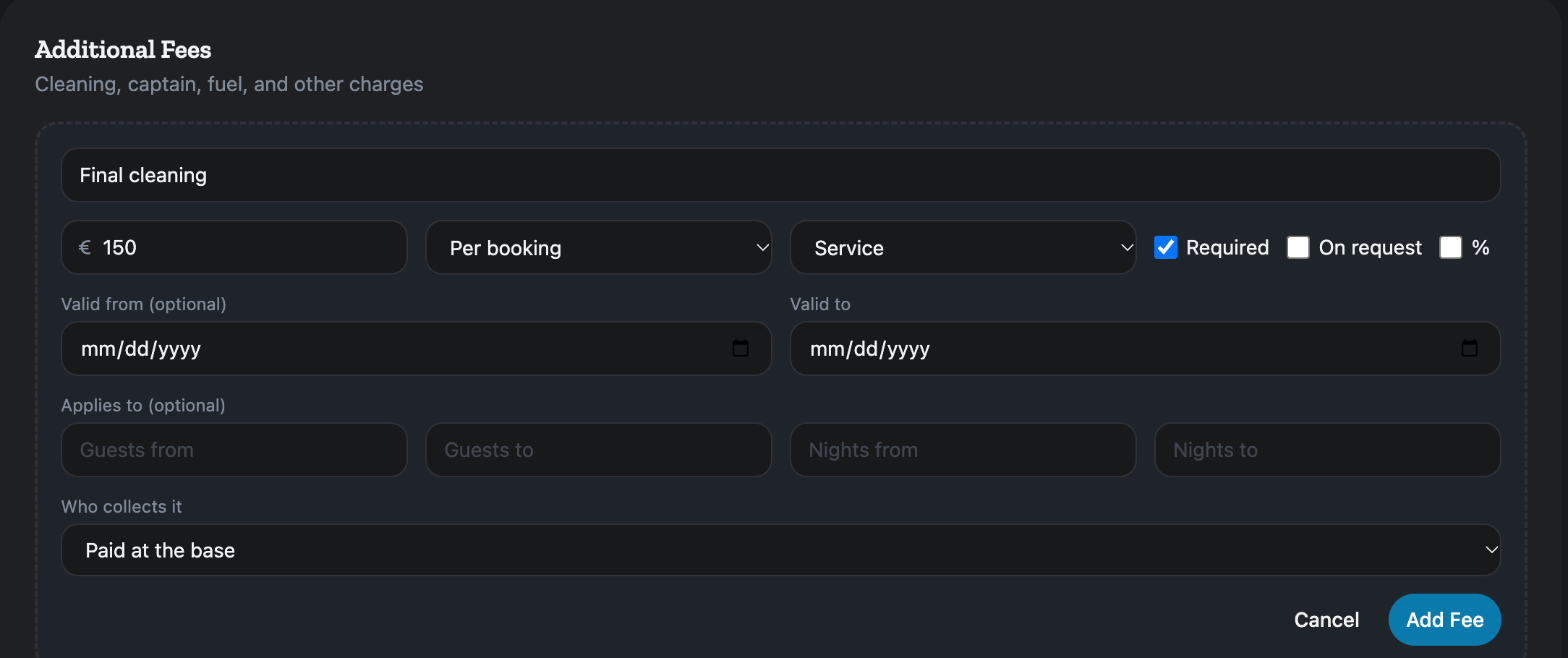
The fee is saved at once. You do not need Save Changes. Cancel closes the form without saving.
Required or optional
A required fee counts in the price guests see for your boat. An optional fee is an extra the guest can choose at checkout. How guests see both is explained in Fees & Pricing.
Paid at the base or Billed at booking
Paid at the base means the guest pays you at the base when they collect the boat. Billed at booking means we charge it with the booking. A new fee starts on Paid at the base.
A fee as a percentage
Tick % to make the amount a percentage. A percentage is charged once per booking. Instead of how often, you then pick what it is taken on: of list price, of the daily price or of the charter price + advance extras.
Limit a fee to some dates, crews or lengths
These fields are optional. Leave them empty and the fee applies to every charter.
- Valid from and Valid to: the dates the fee applies.
- Applies to: Guests from and Guests to for the crew size, Nights from and Nights to for the length of the charter.
A fee priced by crew size, such as a park fee for 2 guests, 3 guests and so on, is one row per size. Click the duplicate icon on a fee to copy it into a new form, change the size and the amount, then click Add Fee. Nothing is saved until you do.
If two rows with the same name can both apply to one charter, an amber note appears under the fee: Overlaps another row, a charter matching both is charged both. Check the dates or sizes if that is not what you meant.
Change or delete a fee
Each fee in the list shows Required or Optional, its amount and how often, and whether it is paid at the base or billed at booking. Click the pencil to edit it, then Save. Click the bin to delete it and confirm Delete this fee?.
A skipper
Whether your boat sails with a skipper is set in Charter Rules, under Skipper: Optional (add-on), No skipper or Skippered only. Add the skipper's price here as a fee. Tick Required if every guest must take one. A required skipper fee also makes the boat skippered only.
The security deposit is not a fee
Do not add the security deposit here. Set it in Charter Rules, under Security Deposit. Both are covered in How do I edit my boat's listing?.
Boats from MMK or Nausys
On a boat priced through MMK or Nausys, this section says Extras come from MMK. To set your own, switch the pricing source to Direct. Change those extras in MMK or Nausys, or take the boat over as described in How do I switch a boat between MMK/Nausys and my own prices?.
Your seasons and daily rates are set separately, in How do I set my boat's prices and seasons?.
For every other screen in your dashboard, see the Owner Dashboard guide. If something here does not match what you see, ask Mermaid in the chat, or write to support@charter.boats.