
To rent out your boat on charter.boats, open charter.boats/list-your-boat, click Get started, and fill in the 9-step List Your Boat wizard. It takes your make, model, specs, marina, photos, daily rate and policies, and the boat goes live by itself once it has what guests need.
If your boat is already on MMK Booking Manager or Nausys, you do not need the wizard. Those boats are added to charter.boats automatically.
If your boat is already listed on Boataround, you can import it instead of typing it again. See How do I import my boat from Boataround?.
Where to start
- If you are new to charter.boats, go to charter.boats/list-your-boat and click Get started. Sign in first if you are asked to.
- This turns your account into a boat owner account and creates a company in your name. You can rename the company later under Settings, Company.
- The wizard opens.
If you already have an owner account, open your dashboard, click Boats, then + Add Boat at the top right. With no boats yet, the page shows Add Your First Boat instead. In the boat editor, Add Boat sits at the top of the boat list.
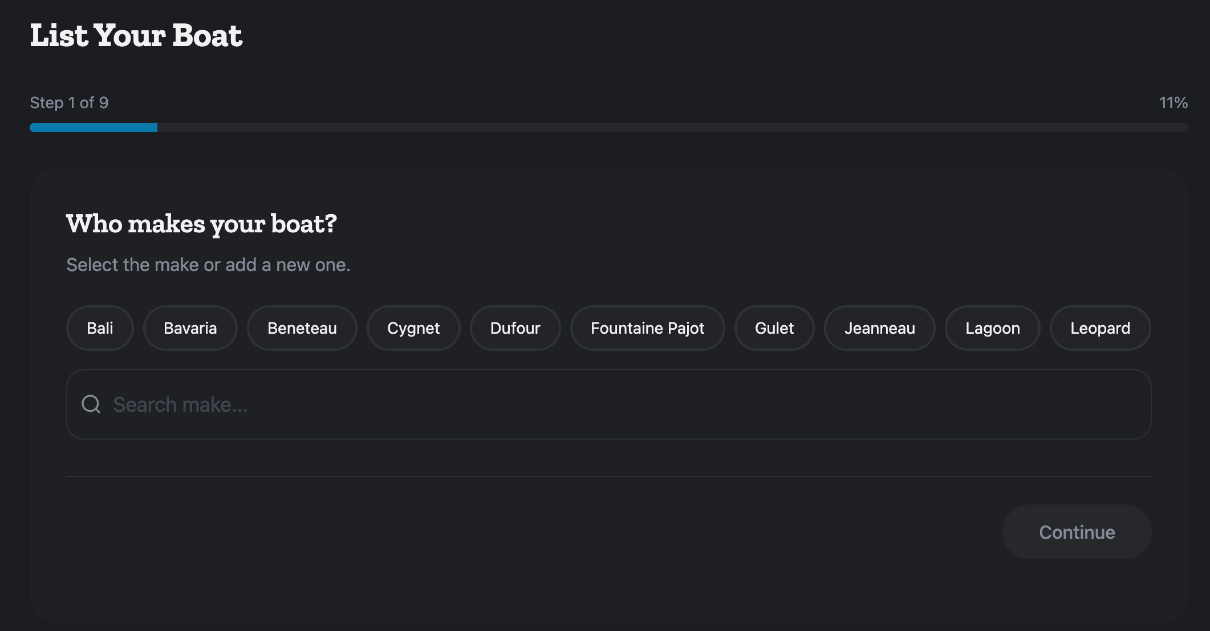
The 9 steps
The bar at the top shows where you are, for example Step 1 of 9. Click Continue to move on and Back to go back.
- Who makes your boat? Click a make, or type it in Search make... and pick it from the list. You must pick a make from the list to continue.
- What model is your boat? Click a known model, or type it in Model Name. If that model has no boat type yet, also pick a Boat Type. When you pick a known model, the wizard fills in specs and common equipment from similar boats. You see Loading smart defaults... while it does.
- What year was your boat built? Drag the slider or type the year.
- Tell us about your boat's specs. Set Length, Max Guests, Cabins, Berths and Toilets. These fields already have numbers in them when you arrive: 6 guests, 1 cabin, 2 berths and 1 toilet, or the figures of similar boats. Check each one and change it to your boat's real numbers. MMSI Number, GPS Modem Model and GPS Modem IMEI are optional. The MMSI is on your VHF radio or DSC controller. The IMEI is printed on the modem label.
- Where is your boat based? Search your marina in Marina and pick it. If it is not there, click Contact us under Can't find your marina? and we add it.
- What equipment does your boat have? Click everything your boat has. Guests filter search results on exactly these items. This step is optional.
- Add photos of your boat. Click Click to upload photos. PNG or JPG, up to 10MB each. You need at least one. The first photo is marked Primary and becomes the cover.
- Set your daily rate. Under Price Periods, enter From, To and Daily Rate, in euros per day. Click + Add another period for a second season. You may see a hint such as Similar boats charge X - Y per day. Every period needs dates and a rate above 0. Periods repeat every year.
- Set your policies. Instant Book is on to start with. Security Deposit starts at 3,000 euros: type your own amount, or 0 for no deposit. It is held on the guest's card. Preferred Charter Days are the days guests can start a charter, with Saturday already picked. Check-in time and Check-out time are empty until you fill them.
Click Create Listing. You land on the Boats page.
Is my boat live?
Your boat goes live by itself once it has a title, a marina, at least one photo, check-in days and a guest capacity, and its booking mode is not Disabled. A boat with no prices can be live, but guests cannot book it until it has prices.
The wizard builds the listing title from the make, model, length and boat type. The description starts as the title followed by "available for charter." Change both in the boat editor, see How do I edit my boat's listing?.
Check your new boat
- On the Boats page, click your boat's name. The boat editor opens.
- Check that your photos are there.
- Scroll to Pricing and check that your price periods are listed.
If Create Listing shows an error, look on the Boats page before you try again. The boat may already have been created.
What to do next
Set your seasons in How do I set my boat's prices and seasons?. Add cleaning, a skipper and other charges in How do I add cleaning, skipper and other fees to my boat?. Choose how guests book in Instant Booking or Approval Needed. If you also sell the boat on other sites, connect their calendars with Calendar Sync.
Changed your mind before adding a boat? The empty Boats page has Switch back to regular account.
For every other screen in your dashboard, see the Owner Dashboard guide. If something here does not match what you see, ask Mermaid in the chat, or write to support@charter.boats.