
To become a charter.boats affiliate, sign in, open Settings, then Affiliates, pick a name for your link and click Get my link. Anyone with an account can join, and your link works at once. Share it anywhere, and you earn a share of our commission on charters booked by the visitors it sends.
Your current share and how it rises are shown on the page. The full affiliate terms are in section 12 of our Terms, which you agree to when you join.
How to get your link
- Sign in and open Settings.
- Click Affiliates.
- Under Become an Affiliate, type a name after charter.boats?ref=. Use 2 to 20 letters or numbers. Leave it blank and your account name is used.
- Click Get my link. You see Your affiliate link is ready.
If the name is in use, you see that it is already taken. Pick another one.
How to share it
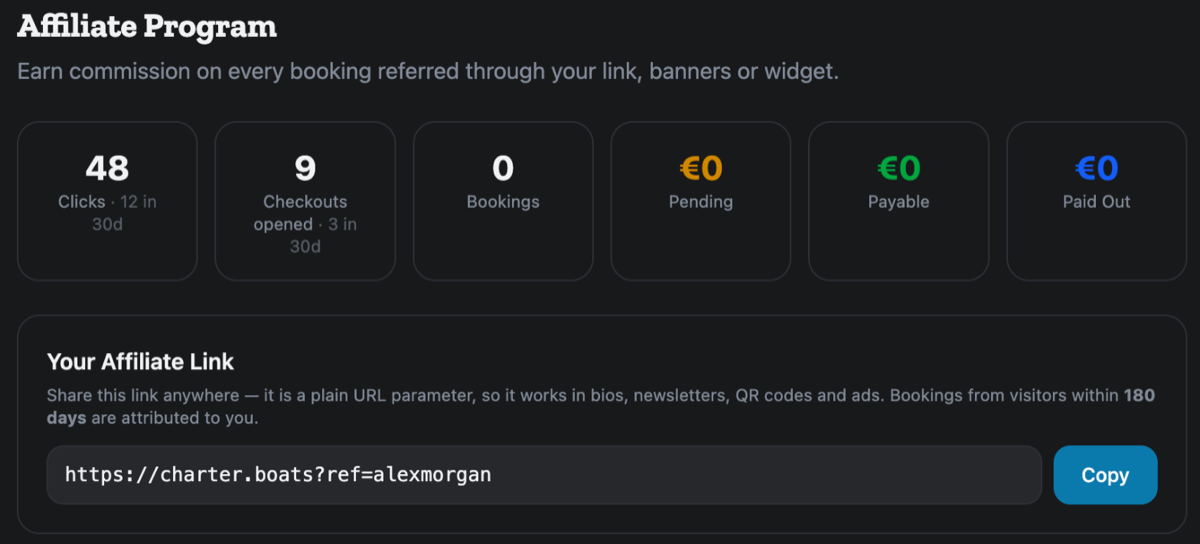
Under Your Affiliate Link, click Copy. The link is a plain web address with your name at the end, so it works in a bio, a newsletter, a QR code or an ad.
When someone opens your link, their browser remembers you for the number of days shown on the page, 180 by default. A booking they make in that time is credited to you. If they click another affiliate's link later, the latest link counts.
Which bookings count
The Commission box shows your Attribution rule:
- New customers only: you are credited when someone who has never booked with us books through your link.
- One booking per guest: each guest you send is credited once.
- Every booking: each guest you send is credited every time they book.
What the numbers mean
- Clicks: visits through your link, with the last 30 days beside it.
- Checkouts opened: visitors who started a booking.
- Bookings: bookings credited to you.
- Pending: your share on charters that have not taken place yet.
- Payable: your share on charters that are done and not paid out yet.
- Paid Out: what you have been paid.
Banners and a search widget
Under Banners & Logos, Open the asset library opens our banners, logos and videos. Copy the snippet under it to wrap any of them in your link.
Under Widget Embed, pick a Layout, a Theme and an Accent colour, then click Copy and paste the code into your website. It adds a boat search to your page, and bookings through it earn the same as your link.
Getting paid
Add your bank details under Payout details on the same page.
If something here does not match what you see, ask Mermaid in the chat, or write to support@charter.boats.
This article is part of the agent guide.