
Charter calendar sync on charter.boats keeps your boat's free and booked dates the same on every site you sell it. Boats on MMK Booking Manager or Nausys sync by themselves. For Click&Boat, GetMyBoat, Boatsetter, SamBoat, Google Calendar, Apple Calendar and any other site with an iCal link, you paste one link each way under Settings, Integrations.
An iCal link is a web address ending in .ics that almost every booking site and calendar app can give you. You paste theirs into charter.boats so their bookings close your dates here, and you paste ours into their site so our bookings close your dates there.
MMK Booking Manager and Nausys
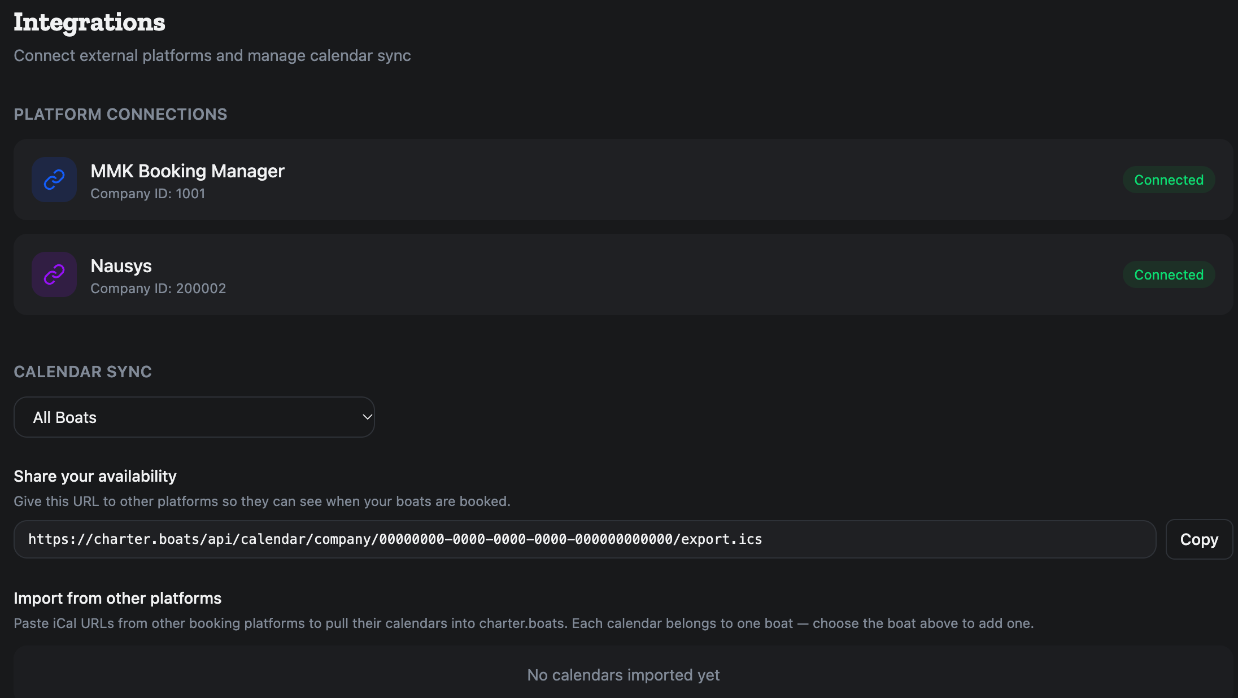
You set nothing up for MMK Booking Manager or Nausys. Companies and boats listed there are added to charter.boats automatically, and their availability is pulled in automatically. To pull it right now, click Sync on the Boats page, in the Calendar view.
Under Platform Connections on Settings, Integrations, each system shows Connected, with your company ID, or Not connected. There is nothing to click there. If you sell on MMK or Nausys and it still says Not connected, contact us.
A booking on a boat priced through MMK or Nausys places an option in that system. A block you set on charter.boats places a hold in the system that prices the boat. To hold it in the other system as well, turn on X-Lock, see How do I block dates on my boat's calendar?.
Where to find the iCal link on each site
The same tips are on the screen, under Where to find iCal URLs.
- Click&Boat: My Boats, then Calendar, then Sync.
- GetMyBoat: Dashboard, then Calendar, then Export iCal.
- Boatsetter: Calendar, then Export, then iCal.
- SamBoat: Settings, then Calendar Sync.
- Google Calendar: open the calendar's Settings and copy its Secret address in iCal format. You paste this link. There is no sign-in with Google here.
- Apple Calendar: File, then Export, then share the calendar link.
If you keep bookings in a spreadsheet, put them into a Google Calendar first and connect that.
How to import a calendar
- In your dashboard, open Settings, then Integrations, and find Calendar Sync.
- In the drop-down, pick the boat the calendar belongs to. Under All Boats there is no + Add button, because each calendar belongs to one boat.
- Under Import from other platforms, click + Add.
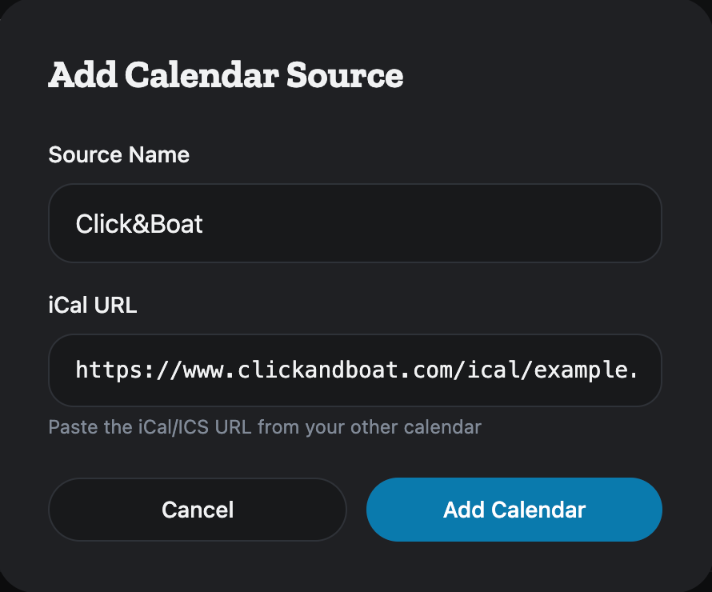
- In Add Calendar Source, type a Source Name, for example GetMyBoat or Google Calendar.
- Paste the link into iCal URL.
- Click Add Calendar.
- Click the Sync now icon on the new row to read it straight away.
Repeat for each site and each boat. Every boat keeps its own list, because each listing elsewhere has its own link.
Each row shows the calendar's name, when it was last read, and whether that worked. A calendar that failed shows the error in red. The bin icon removes a calendar after you confirm Remove this calendar source?.
What an imported calendar does
We read every imported calendar every 10 minutes. Its bookings close those dates on charter.boats. They do not reach MMK or Nausys unless X-Lock is on.
How to share your charter.boats calendar
- On the same Calendar Sync screen, look at Share your availability.
- Pick one boat for that boat's link, or All Boats for one link that covers all your boats.
- Click Copy. You see Export URL copied.
- Paste the link into the other site's iCal import.
Use the right link for each boat if you list several. The link lists your bookings, your blocks and the dates your other calendars closed. Charters that have ended drop off it.
Other sites read this link on their own schedule, and some are slow: Google Calendar can take several hours. When a last-minute booking comes in, block the dates on each site yourself until they have all caught up.
If a calendar is not syncing
- Check that the iCal link is public. Some sites give a working link only once you turn sharing on or create a new link.
- Click Sync now and read the error on the row.
- If you see the same booking twice, you have probably imported a calendar that already contains your charter.boats link. That makes a loop: remove one of the two.
A booking deleted on the other site disappears here the next time we read its calendar.
Set this up once per boat and it runs on its own: MMK and Nausys stay in step automatically, every other site is one link each way, and Sync now is there when you want to check. For the rest of the dashboard, see the Owner Dashboard guide. If something here does not match what you see, ask Mermaid in the chat, or write to support@charter.boats.