
Pro search is the yacht charter agent's view of charter.boats: one line per boat, with the price, how busy the boat is, and Your commission (est.). Pick a place and dates, and every priced row shows what the client pays and roughly what you earn. Click a row to see the full price for the stay.
Your commission estimate takes our commission on the stay's charter price, removes the estimated card processing cost, applies your agreed share, and then takes off any discount you give the client. It is an estimate, worked out for the dates you picked.
How to open Pro search
Once your agent access is active, a search from the home page opens Pro search. You can also go to charter.boats/pro. If you are not signed in as an agent, the page reads Pro search is for charter agents. To get access, see How do I become a charter.boats agent?.
On a computer, the Mermaid panel opens beside the results, so you can ask about a boat or a place while you search.
How to search
- Type a place in Location and pick it from the list.
- Pick your Dates. Without dates, the sidebar reads Pick dates for the week price, margin & options, and the rows show a starting price only.
- Narrow it down with Any boat type, Boat name... and the filters below them.
- Read the results. Each row is one boat.
Consumer → opens the same search on the guest search page, which is what your client sees.
What each row shows
- The boat's make and model, its marina, type, year, length, guests and cabins. Click any of these to filter the list by it.
- How busy the boat is: % booked (12m) over the last twelve months, option this week when someone has just held it, and upcoming options already placed on it.
- The price: the rate per day, then Due now, Paid at pickup and Total for the week.
- Your commission (est.) for that week.
- Reserve via us opens the boat's page in a new tab, where you hold it for your client. See How do I hold a boat for my client and send them the link to pay?.
- MMK ↗ or Nausys ↗, when the boat is in one of those systems, opens it there.
A row that reads Currently unavailable has no price for your dates.
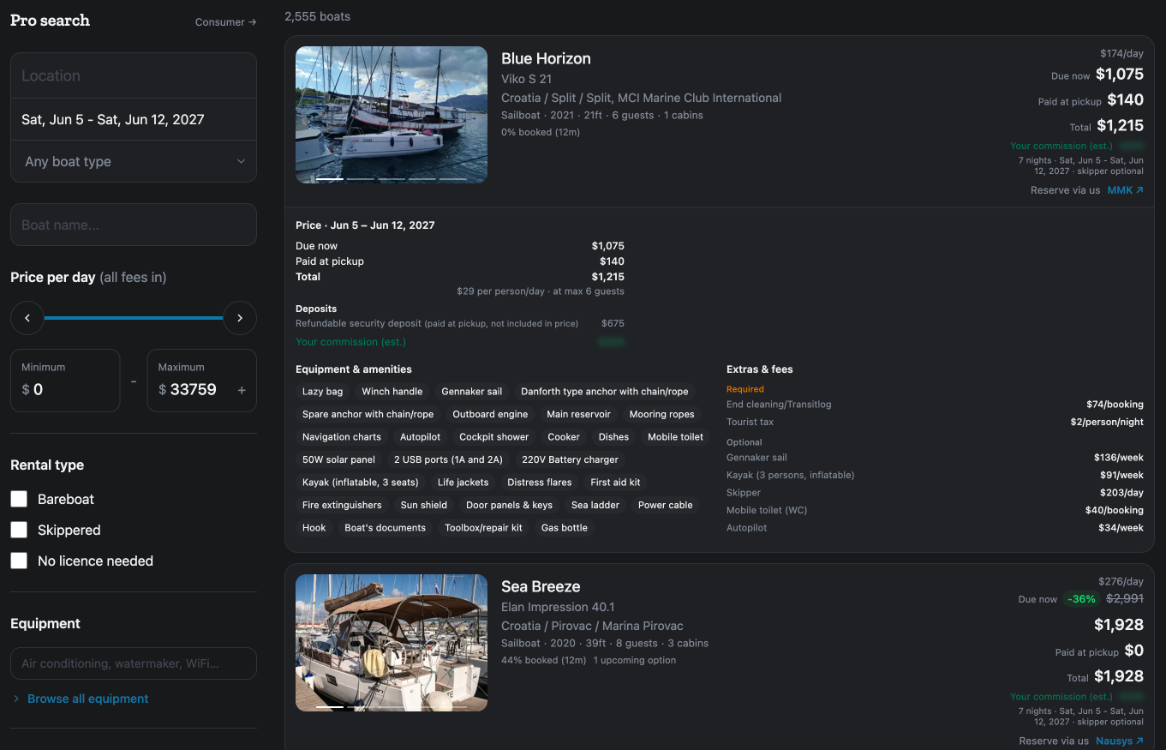
The full price for your dates
Click the middle of a row to open it. You see:
- Price with your dates, any discount, and then Due now, Paid at pickup and Total.
- The price per person per day.
- Deposits, listed apart. A deposit is never part of the Total.
- Your commission (est.) for exactly these dates.
- Equipment & amenities. Click one to show only boats that have it.
- Extras & fees, split into required and optional.
If you see No price for these dates — open the boat page for its bookable weeks., the boat has no price for that stay. Its page shows which weeks can be booked.
Going back a step
After you click a model, a marina or an amenity to filter, press Esc to return to the search you had before.
Lower down the list
When few boats match exactly, rows under Close alternatives change one thing, such as the dates or the place. Further down, boats with no prices loaded yet are listed so you know they exist, with nothing to quote.
If something here does not match what you see, ask Mermaid in the chat, or write to support@charter.boats.
This article is part of the agent guide.