
To hold a boat for your client, open the boat's page with your dates, click Reserve, and copy the Guest link from the booking that opens. Nothing is paid when you reserve. The dates are held as an option, and your client opens the link, signs in and pays.
The hold lasts as long as the boat's own booking system allows, and the booking shows when it expires. If your client does not pay before then, the hold lapses.
How to hold a boat
- Open the boat's page. From Pro search, click Reserve via us on its row. See How do I search boats and see my commission in Pro search?.
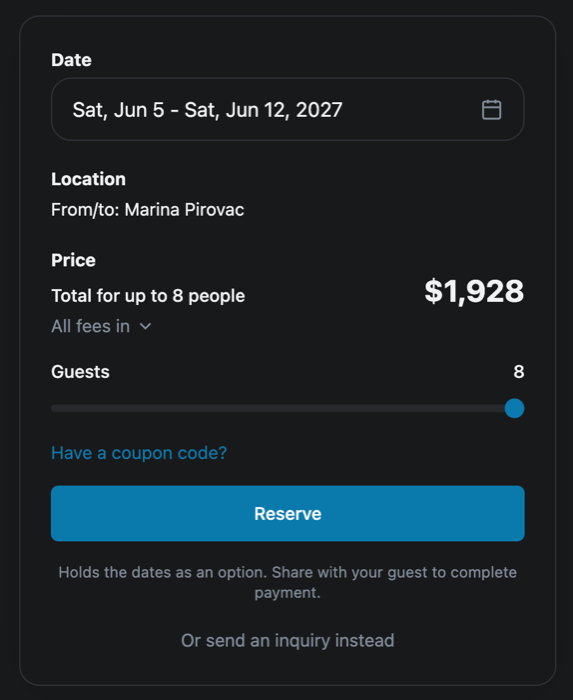
- Pick the dates and the number of guests in the booking box.
- Check the price under Price.
- Click Reserve. Under it you read Holds the dates as an option. Share with your guest to complete payment.
- The booking page opens. Its status reads Option, with the time the hold expires.
If the hold cannot be placed, you see Could not place the hold. Please try again.
When the boat is already held
If someone else holds your dates, the button reads Join waitlist, with the note Reserves your place in line; you'll get a link to share the moment it frees up. Your booking shows On waitlist. If the hold ahead of you lapses, the week becomes your option, with a date to book by.
How to send your client the link to pay
- On the booking page, find Agent Only Section. Only you see it; your client does not.
- Click Guest link. You see Claim link copied.
- Send the link to your client by email or message.
Your client opens the link and sees Booking for you, with Sign in or create an account to view and pay. Once they sign in, the booking moves to their account, they get an email about it, and they pay on the booking page. The link works once. What your client sees is in Someone sent me a booking link — how do I claim it and pay?. You keep the Agent Only Section until the booking is paid.
The same panel lets you give your client a discount out of your commission. See How do I give my client a discount from my commission?.
Who is told about the hold
When you reserve, Mermaid writes a message on the booking saying the boat is held for those dates, until when, and that nothing has been paid yet, with a link to the booking. It goes to you and to the boat's operator, and by email as well.
Limits on holds
A charter you reserve can be at most 31 days long, and you can have up to 5 options open at once, unless we set other limits for your account. These limit the length of the charter, not how long the hold lasts. If you go over, the message tells you your limit, such as Agent reservations are limited to 31 days per booking or You already have 5 active reservations (cap 5). Resolve one before creating another. An option stops counting once it is confirmed, cancelled or expired.
What each status on your bookings means is explained in What do Option, On waitlist and the other booking statuses mean?. Your holds are listed in your Agent Dashboard under Bookings, see Where do I see my clients' bookings and what I have earned?.
If something here does not match what you see, ask Mermaid in the chat, or write to support@charter.boats.
This article is part of the agent guide.