
When the week you want is held by another guest, you can join the waitlist for it. Boat availability on charter.boats shows those weeks as held, not booked: someone has the dates on hold but has not paid yet. Pick them, click Join waitlist, and you are first in line. Nothing is charged to join. If the hold runs out, the dates become your booking and you have time to pay.
How to spot a held week
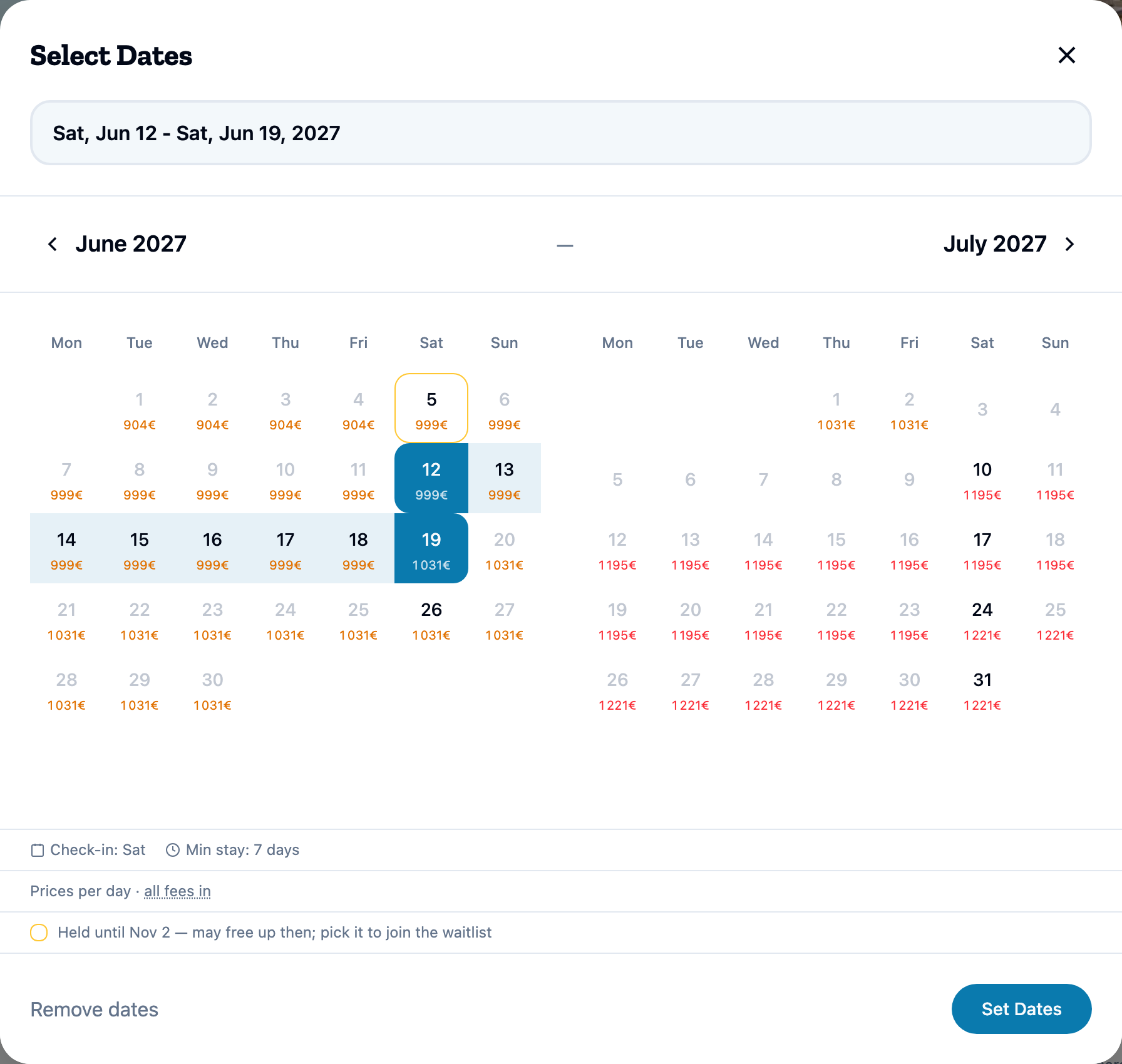
Open the boat page and click the date to open Select Dates. A held day has an amber ring. The legend under the calendar says how long the hold lasts, for example Held until a date — may free up then; pick it to join the waitlist. Where the end of the hold is not known, it reads Held — may still free up; pick it to join the waitlist.
How to join the waitlist
- In Select Dates, pick dates inside the held days and confirm them.
- The booking box shows the price for those dates and the button Join waitlist, with We'll save your spot and email you the moment it frees up.
- Click Join waitlist. If you are not signed in, you are asked to sign in first.
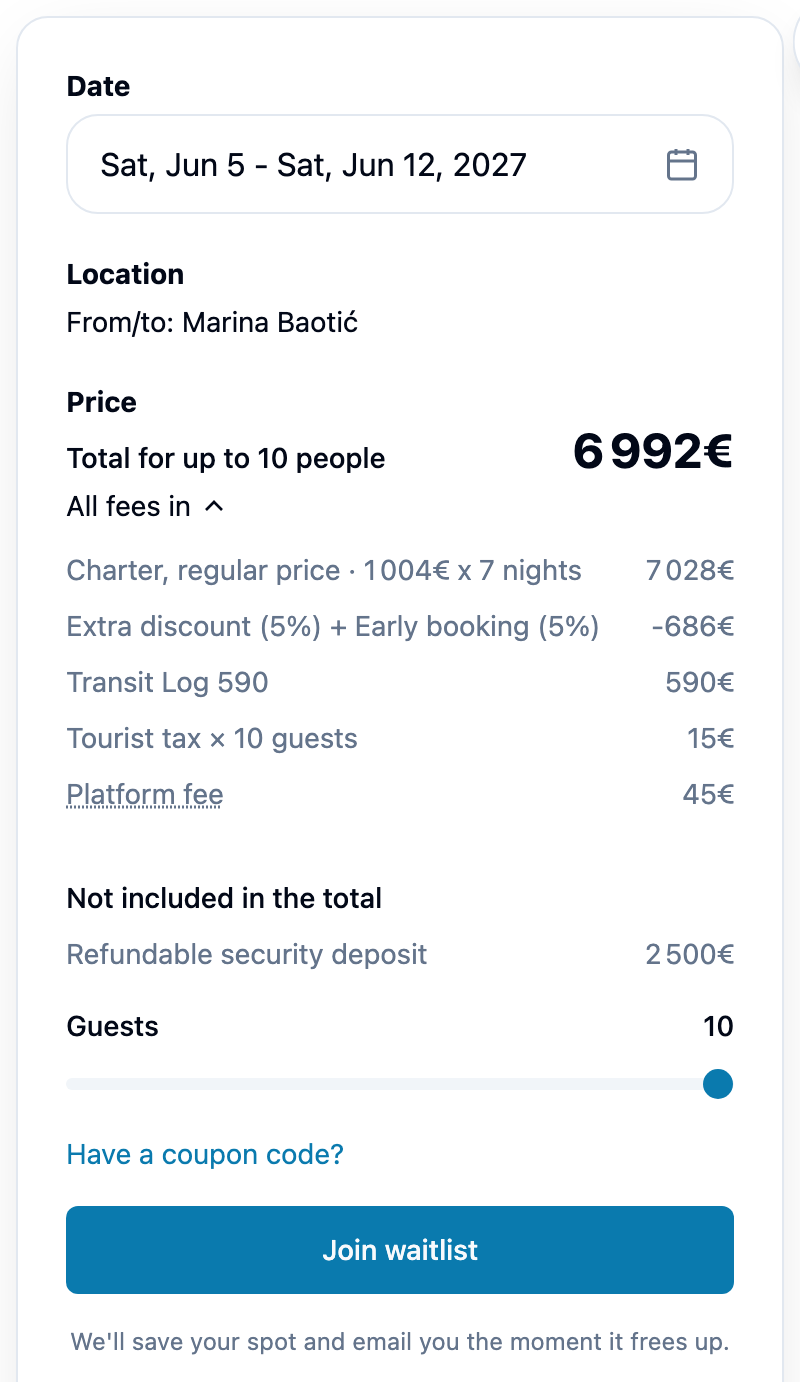
Once you have joined, the box reads You're on the waitlist — we'll email you the moment these dates free up. It also shows Current price if it opens up with the total, and a Leave waitlist button.
There is one place per held dates. If another guest is already in line, the box says Someone is already waiting on these dates. and there is no button. Try other dates, or another boat.
Where your place shows
Your place appears in My Bookings with the badge On waitlist. The card says You're on the waitlist — we'll email you if this frees up. and has a Leave waitlist button. Clicking the card opens the boat page with your dates. A waitlist place is not a booking yet, and nothing is paid for it.
When the dates free up
If the other guest's hold runs out and you are next, your place becomes your booking, with the status Awaiting payment. The dates are now held for you, with their own expiry. Nothing has been charged.
You get a message in your charter.boats messages with the current price. On the boat page, the button reads Complete your booking, with Your dates opened up — you're first in line. Book by and the date. It opens your booking page, where you pay. How to pay is in How do I pay for my booking, pay the balance or get a receipt?. If you do not pay by that date, the hold lapses and the dates are released.
When the dates do not free up
If the other guest pays, the dates are taken for good. You get an email, Those dates were just booked, and your place closes.
If the charter dates arrive while you are still waiting, your place closes too. You get an email, Your charter dates have started, and the place shows Expired under Past in My Bookings. What each badge means is in What does my booking status mean?.
How to leave the waitlist
Click Leave waitlist, on the boat page or on the card in My Bookings. There is nothing to pay, and the place drops out of your list.
When it is worth joining
A held week is not a lost week. Join the waitlist for the week you really want, and keep looking at other boats in the meantime. Being on a waitlist does not stop you booking something else. If you book elsewhere, leave the waitlist so the place goes to the next guest. Booking a boat outright is covered in How do I book a boat on charter.boats?.
This article is part of the booking help. If something here does not match what you see, ask Mermaid in the chat, or write to support@charter.boats.