
To book a yacht charter on charter.boats, open the boat's page, pick your dates in the booking box and click Book Now. On the checkout page you check the price, tick any extras, enter your card and click Complete Booking. Your booking page opens as soon as the payment goes through.
You need to be signed in to book. If you are not, Book Now takes you to sign in and then back to the boat.
Pick your dates on the boat page
- Click Date in the booking box. On a phone, the same box sits in the bar at the bottom of the screen.
- In Select Dates, pick your first and last day. Each day shows its price, all fees in. Under the calendar you see the boat's Check-in day and Min stay.
- Click Set Dates.
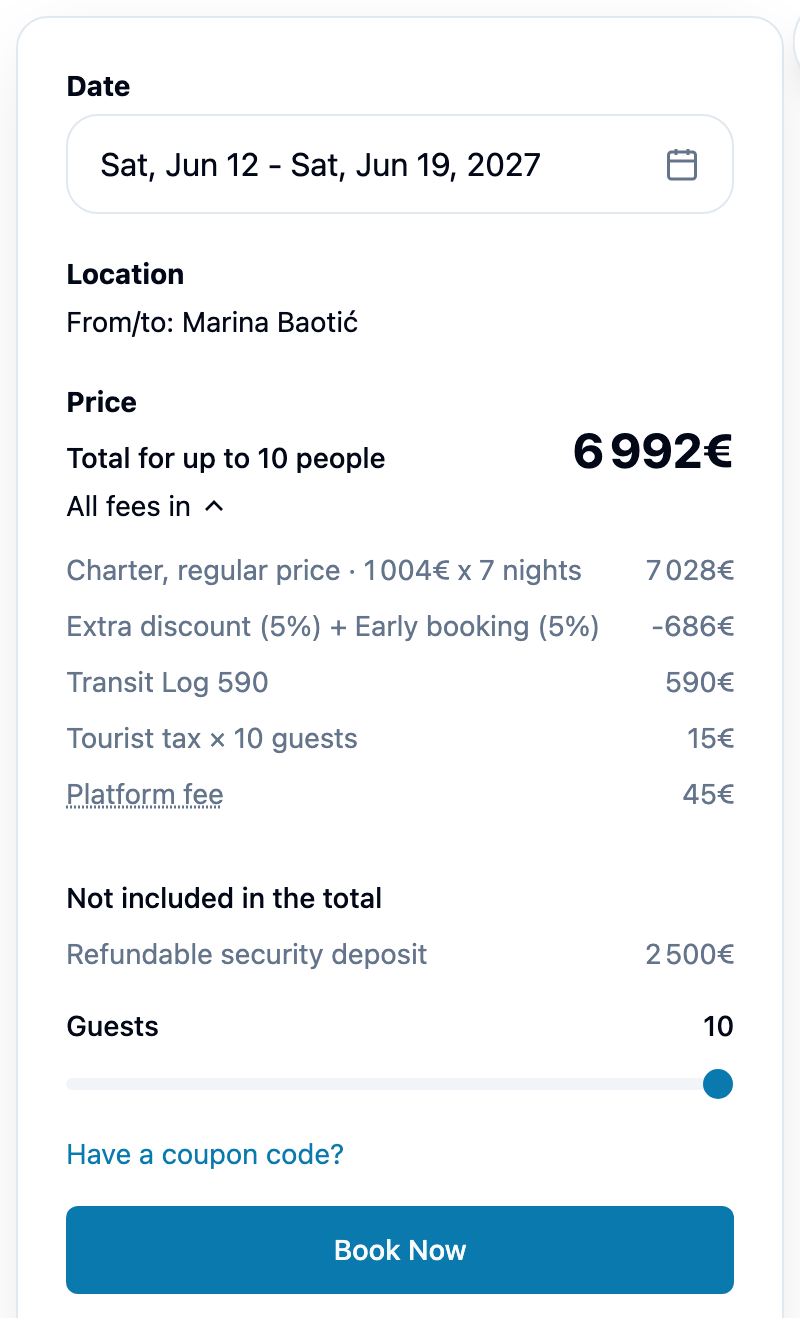
- The box now shows Location (the marina you leave from and return to) and Price: Total for up to your number of people.
- Click All fees in to see what the Total holds: the charter, any discounts, the operator's fees and the Platform fee. The security deposit is listed below it, under Not included in the total, because it is refundable.
- On boats that charge some fees per person, move the Guests slider to your group size.
- If you have a coupon, click Have a coupon code?, type it in Enter code and click Apply. Enter it here: checkout has no coupon field.
- Click Book Now.
What each line of the price means is explained in Fees & Pricing.
If your dates were just taken
Book Now checks the dates with the charter company before checkout opens. If they are no longer free, the box says so and shows Here are nearby options: with other dates and their price. Click one to pick it.
If the button reads Join waitlist instead, someone else is holding those dates. See How does the waitlist work?.
Check and pay on the checkout page
The page is called Complete your booking.
- Check the boat, When and Duration.
- Read Price Details. It ends with the Total, then Payment timing: what is Due now and charged today, and what is Paid at pickup at the base on your check-in day.
- Some boats show a Payment plan. Pay in full is one charge today, sometimes with a discount marked Save. Split payment is a deposit now and the balance later, with its date shown under Payment timing.
- Under Optional Extras, tick what you want. Included in Price lists what the charter already covers.
- Read Cancellation Policy. On some boats a Security Deposit box says how the deposit is held on your card; see Security Deposits & Damage Claims.
- Under Payment, fill in Name on card and your card details. Payment is handled by Stripe.
- Click Complete Booking. The button shows the amount due now. Clicking it accepts the Terms of Service and the Privacy Policy.
After you book, you are asked for your crew's names and passport details for check-in.
If the price changes while you pay
The charter company's price is checked once more when you pay. If it moved, you see Price has changed slightly with the old and new figures, or Your payment plan has changed. Click Accept & Pay to go on, or Cancel. If the price was updated before you reached checkout, a Prices updated box tells you, and Got it closes it.
If the timer runs out
In the last two minutes of the hold, a bar reads Your reservation expires in and counts down. If it reaches zero you see Dates Released. Click Go Back to return to the boat and start again.
After you pay
Your booking page opens with Booking Confirmed! You'll receive a confirmation email shortly. You find it again under My Bookings in your account menu. What its status means is in What does my booking status mean?. If you chose a split payment, How do I pay for my booking, pay the balance or get a receipt? covers the balance, and How do I cancel my booking, and what do I get back? covers cancelling.
This article is part of the booking help. If something here does not match what you see, ask Mermaid in the chat, or write to support@charter.boats.